Live Anime Shimeji Pets
- 4.7
- Rating
- 1.00M
- Installs
- Free
- Price

 Analysis by App-foxy
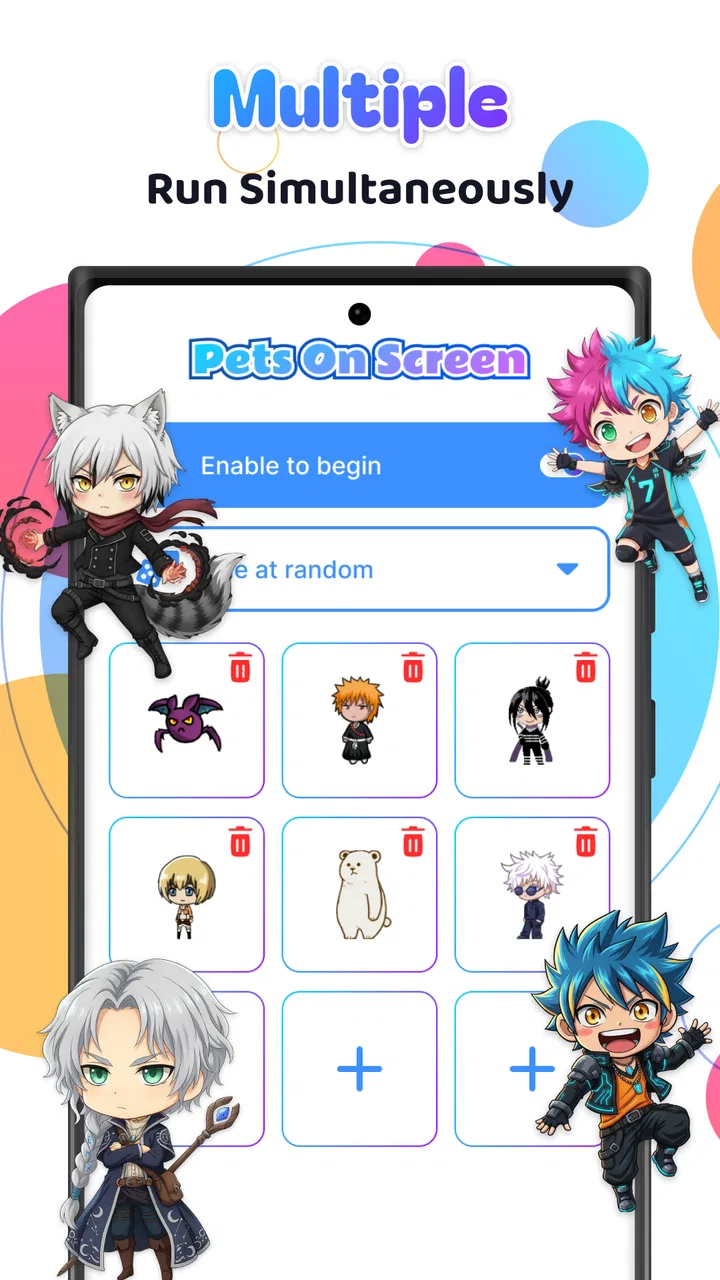
I installed Live Anime Shimeji Pets expecting a small personalization tool rather than something I would actively use for long periods. That turned out to be the right way to approach it. This is an Android app from Hydra Global Ltd. that places animated anime-style companions over the screen, giving an otherwise ordinary phone a more playful feel. It is free to start, rated for Everyone, and currently sits at version 1.1.1, so the experience is easy to try without treating it like a major commitment.
The appeal is immediate: instead of changing only a wallpaper or icon pack, I get characters that occupy the visible space of my phone while I move between apps. That makes the personalization feel more alive, but it also means the app has to fit around everything else I do. In my experience, the important question is not simply whether the characters are cute. It is whether I enjoy having a moving companion on the screen often enough to accept the extra visual activity and occasional interruption.
How the animated companion fits into a normal phone routine
I find this kind of animated companion easiest to judge in ordinary moments: checking a message, browsing during a break, or unlocking the phone between tasks. Those quick handoffs reveal whether the character feels like a pleasant accent or extra motion I have to work around. I’d also pay attention to how that impression changes when I’m using the phone for something that needs my full focus.
You May Also Like

 Blood Strike: 2.5 Anniversary
Blood Strike’s Loadouts Turn Every Drop Into a Tactical Gamble
A close look at Blood Strike’s custom loadouts: how fast access to signature weapons reshapes its battle royale rhythm, rewards preparation, and narrows the gap between fights.

 Pandora - Music & Podcasts
Pandora’s Music Is Easy to Start, but Harder to Recover
Pandora’s strength is its low-effort path from a seed to a station. Its weak spot is how much confidence it asks you to place in connection, setup, and quiet recovery.

 8 Ball Pool
 Is Built on Rivalries, Rematches, and Routine
A close look at the rivalries, rematches, shared routines, and unanswered safety questions that turn a quick pool match into a persistent mobile community.

 Samsung Music
’s Quiet Strength Is Playing What You Already Own
Its reach comes less from spectacle than from dependable access to a personal library. That simplicity is both the app’s strongest retention engine and its ceiling.

 AccuWeather: Weather Radar
AccuWeather Review: A Quick, Clear Forecast for Everyday Decisions
For everyday plans, the best forecast is the one you can understand quickly. AccuWeather makes rain timing, radar, and local conditions easy to act on, with a few trade-offs.

 Hill Climb Racing
Why Hill Climb Racing Still Turns Crashes Into One More Run
A tiny car, a bumpy hill and one more upgrade: Hill Climb Racing keeps resurfacing because its simple chaos makes every near-miss feel personal.
More From Our News Desk



Starting with a plain screen and a clear purpose
My starting condition was a phone that worked perfectly well but looked routine. I already had the usual ways to personalize it: a wallpaper, a few widgets, and app icons arranged for convenience. Those choices change the background or layout, but they do not create much personality once I open another application. This is where the Shimeji concept feels different. The character is not confined to the home screen, so the result can follow me into the rest of my phone use.
I found the app most appealing when I treated the character as a small visual companion rather than as a serious productivity tool. It adds charm during casual browsing, messaging, or waiting for something to load. If I wanted a quiet, distraction-free interface, the same quality became less welcome. The moving figure can pull the eye away from a message or make a clean screen feel busy, especially when I am trying to concentrate.
That trade-off is worth understanding before installing it. A static wallpaper is predictable and almost invisible after a while. A live character remains noticeable because movement is the point. For someone who enjoys anime-inspired decoration, that liveliness is the main reason to try the app. For someone who sees every extra animation as clutter, the usual wallpaper or launcher customization is probably a better fit.
Installing and deciding whether it earns screen space
The app is available for Android devices running version 7.0 or later, which covers a broad range of phones. Its free entry point makes the first decision straightforward: install it, see how the animated presence feels in daily use, and decide whether it deserves to stay. The audience is broad as well, since the content rating is Everyone, although parents should still make their own judgment about whether a constantly visible character suits a child’s device and routine.
Hydra Global Ltd. has positioned the app in the personalization category rather than as a game. That distinction matters. I did not approach it expecting levels, goals, or a structured activity. Its value comes from changing the atmosphere of the device. The character is there to decorate and entertain in small moments, not to replace a game or provide a task-based reason to return.
The app has passed the curiosity stage for many users: it shows more than one million installs, with an average rating of 4.6 from around 44 thousand ratings. Those figures suggest that the basic idea connects with a sizable audience, but they should not be read as a promise that every phone setup will feel equally comfortable. A live overlay is personal by nature. The same animation that makes one home screen feel cheerful can make another person’s workflow feel interrupted.
Moving from setup to everyday use
My practical workflow was simple. I opened the app, looked at the available character experience, and then returned to the rest of the phone to see whether the companion remained enjoyable outside the app itself. That second step is more important than the first. Many personalization apps look attractive in their own menu, but their real success depends on how naturally the result fits into other activities.
I recommend testing it during three different moments: a relaxed period when you want decoration, a quick messaging session, and a focused task such as reading or writing. This gives a more honest picture than leaving it on during a single idle minute. In my case, the relaxed session showed the strongest side of the app, while the focused session exposed its main weakness: visual movement can compete with the content I actually opened the phone to see.
A useful habit is to decide in advance when the character should be welcome. I liked it more when I thought of it as a mood-setting layer for casual use rather than an always-on requirement. That mindset also prevents disappointment. The app does not need to transform the whole phone to be successful; it only needs to make certain moments more enjoyable.
Understanding the handoffs between screens and activities
The key handoff is from the app’s own experience to the rest of Android. The character has to coexist with the home screen and whatever application I open next. That is where this personalization idea gains its advantage over a normal wallpaper, but it is also where friction can appear. The companion is no longer a background choice. It becomes part of the visual layer I carry into other tasks.
For casual browsing, that handoff can feel smooth because the character adds a little motion without changing what I am doing. During messaging, the outcome depends on how much empty space is available and how quickly I need to read or type. On a crowded screen, any animated element feels more intrusive. I would be especially cautious about using it while navigating unfamiliar interfaces, following instructions, or working with small controls.
This is also why I would not describe the app as a replacement for a launcher, widget collection, or theme pack. Those alternatives usually organize information or change the visual system of the phone in a consistent way. Live Anime Shimeji Pets contributes a character layer instead. It is more expressive, but less useful when the goal is efficiency. The right choice depends on whether the phone is being personalized for mood or for information access.
What the free experience means in practice
The app is free, with in-app purchases ranging from $2.99 to $14.99 per item. I would approach those purchases carefully and only after spending enough time with the free experience to know that the format suits me. The purchase range is relevant because a decorative app can become less attractive if I feel pushed to pay before I have decided whether I even want a persistent animated companion.
My advice is to judge the free version by the basic feeling it creates, not by imagining that a paid option will solve every limitation. If I already enjoy the character on my screen, optional spending may make sense as a way to deepen that interest. If the movement itself feels distracting, buying more content would not address the underlying mismatch. The central decision is about the presentation style, not simply the amount of available decoration.
There is another practical trade-off here: personalization is often temporary. I may love a character for a week and then want a calmer screen. That does not make the app unsuccessful, but it means I would not install it expecting permanent value in the same way I expect from a utility. It works best as something I can enjoy during a particular mood or phase of phone use.
A realistic day with the app
Imagine checking a phone during a short break. I open it to answer a message, glance at a calendar item, and then spend a few minutes browsing. With a traditional wallpaper, the phone looks exactly as it did before. With this app, the animated companion adds a small point of interest while I move between those activities. That can make an otherwise dull pause feel more personal.
Now imagine the same phone during a work session. I open a document, compare details, and switch between screens while trying to keep my attention on a narrow task. The character may still be charming, but it has become another moving object to ignore. In that situation, I would rather use a static personalization choice, at least temporarily. This contrast is the most realistic way to decide whether the app belongs on a particular device.
There is also a social use case. A friend borrowing the phone may notice the character immediately, making the device feel more distinctive than one with a standard background. That novelty is part of the fun, particularly for anime fans and people who like expressive digital accessories. It is less suitable for a phone shared in a professional setting where a neutral appearance matters.
Small workflow tips that make the experience easier to judge
First, test the app with your most frequently used applications rather than only on the home screen. The character’s charm depends on how it behaves alongside your real routine. Second, try it during both portrait and landscape use if you regularly rotate the device. A layout that feels comfortable in one orientation may feel more crowded in another.
Third, separate novelty from long-term usefulness. The first few minutes are likely to feel more exciting because the character is new. I would revisit the phone after a normal day and ask whether the companion made the device more enjoyable or simply made it busier. That answer is more valuable than an initial reaction.
Finally, keep purchases out of the decision until the basic workflow feels right. The free starting point is enough to determine whether animated personalization belongs in your routine. This is a better approach than paying immediately and then discovering that the visual layer conflicts with the way you read, type, or work.
Where the flow breaks down
The biggest break occurs when decoration competes with attention. Because the app’s purpose is visible animation, it cannot be as quiet as a wallpaper. I noticed that the experience is strongest when I am relaxed and weakest when I need a clean, stable interface. That is not a defect in the concept so much as a boundary that users should recognize before making it part of every screen.
Another possible friction point is expectation. The store summary presents a lively character experience, but I would not install this expecting a complete anime game or an interactive assistant. The app belongs to personalization. Its outcome is a more animated phone, not a new activity with progression, objectives, or practical information.
The purchase model may also make some users hesitate. Free access lowers the barrier to trying it, while the separate item prices mean that the longer-term experience can involve spending. I would skip those purchases if I am only mildly curious, if I change themes often, or if I prefer to keep my phone visually restrained. The app is easier to recommend when the character itself is the point, not when I am searching for broad customization controls.
Device compatibility is another sensible checkpoint. Android 7.0 is the minimum operating system, so older phones below that requirement are not candidates. On supported devices, I would still judge the experience by how well the phone handles the added visual activity in my own routine rather than assuming that compatibility guarantees a perfect fit.
Who will enjoy it, and who should choose something else
I would recommend it to anime fans, people who enjoy cute digital companions, and anyone who finds standard wallpapers too static. It is especially appealing if the phone is used for casual browsing and personal expression rather than as a strictly controlled work tool. The Everyone rating also makes it broadly approachable, though individual preferences still matter more than the label.
I would point a different friend toward a wallpaper app, icon pack, or launcher if they want a polished, consistent interface with minimal movement. Those options are usually better for organizing the phone, improving readability, or keeping attention on the current task. Live Anime Shimeji Pets is the stronger choice only when motion and character presence are desirable outcomes.
I would also skip it for a device that must look neutral at all times. A moving anime companion communicates personality immediately, which is exactly why many users will like it, but that same visibility may not suit a business phone, a shared handset, or someone who dislikes explaining unusual screen elements.
My final view after following the full workflow
Live Anime Shimeji Pets succeeds by making personalization feel active instead of static. I liked the way it carried a playful character beyond the home screen, and I found the free starting point useful for deciding whether that style belonged in my routine. Its strongest result is emotional rather than practical: the phone feels more personal, more animated, and less like a default device.
At the same time, I would not leave it running blindly in every situation. The same movement that creates charm can distract during focused work, and the purchase range makes it sensible to test the basic experience before spending. The app is not the right answer for organization, productivity, or a quiet interface.
My recommendation is straightforward: try it if you want an anime-inspired companion that adds life to ordinary phone moments. Give it a full day across relaxed and focused tasks, then decide whether the character improves the experience or gets in the way. For me, it works best as a playful personalization layer that I choose for the mood, not as a permanent replacement for a clean and efficient screen.
FAQs for Live Anime Shimeji Pets
01What is Live Anime Shimeji Pets app about?
Live Anime Shimeji Pets is an interactive app that brings adorable anime characters to life on your mobile screen. These digital companions, known as Shimejis, can be customized and interact with your device in playful ways, enhancing your user experience with animation and personality.
02Can I customize my Shimeji characters?
Yes, customization is a key feature of Live Anime Shimeji Pets. Users can choose from a variety of anime characters and personalize them with different outfits and animations. This allows you to create a unique experience that fits your personal style and preferences.
03Does Live Anime Shimeji Pets affect my phone’s performance?
The app is designed to be lightweight and should not significantly impact your device’s performance. However, users with older devices might notice a slight decrease in speed or battery life due to the animations running in the background. It’s always a good idea to monitor your device’s performance after installation.
04Is Live Anime Shimeji Pets free to use?
The app offers a free version with basic features, allowing you to try out several Shimeji characters. For a richer experience, including more characters and customization options, you can purchase the premium version or make in-app purchases. This ensures you can enjoy the app according to your budget and interest level.
05How do I interact with the Shimeji characters?
Interacting with Shimeji characters is simple and intuitive. You can tap, drag, and even flick them across your screen. They respond with charming animations and sounds, making your device feel more lively and interactive. The app includes tutorials to help you get the most out of your Shimeji pets.
Pros
- Interactive anime characters enhance device personalization.
- Wide variety of characters to choose from.
- Easy to set up and customize on any device.
- Minimal impact on device performance and battery.
- Regular updates with new characters and features.
Cons
- Ads can be intrusive and disrupt usage.
- Limited free content; most characters are paid.
- Some characters lack interactive features.
- Occasional glitches in character animations.
- Requires internet for downloading new content.

Live Anime Shimeji Pets
Gallery